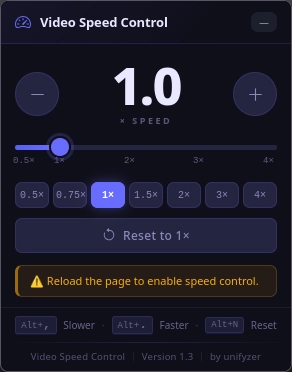

Video Speed Control brings precise speed control for HTML5 videos to your Firefox: lectures at double speed, tutorials in slow motion: you decide. The popup shows the current speed in a large display and can be operated via slider, preset buttons, mouse wheel or arrow keys. Keyboard shortcuts work globally, even without opening the popup. Your chosen speed persists across sessions. The add-on collects no data whatsoever.
Features
0.5× to 4×, finely adjustable
Adjust the speed in 0.1 steps via slider, plus/minus buttons, mouse wheel or arrow keys, with a large speed display and color feedback.
Seven presets
Jump to 0.5× · 0.75× · 1× · 1.5× · 2× · 3× · 4× with one click. Or reset to normal speed with a single tap.
Global keyboard shortcuts
Alt + . faster, Alt + , slower, Alt + N reset: works right in the video, no popup needed.
Works on every website
YouTube, Netflix, Twitch, Prime Video, Vimeo and any other HTML5 video site. Dynamically loaded videos are detected too.
Speed stays saved
Your preferred speed survives tab switches and browser restarts. A subtle toast confirms every change.
No data collection
The add-on collects no data at all, declared and reviewed by Mozilla.
A look inside the add-on